How can I hide my personal information on my Facebook profile?
Since the release of Facebook Timeline in 2012, this has been one of the most commonly asked questions.
Facebook Timeline actually provides a lot more customization capabilities than the previous version of Facebook but they also are a bit more complicated to get the hang of.
Take a look at the video tutorial embedded in this post or simply follow the steps below to learn how to hide your personal contact information on Facebook.
Steps to Customize Visibility of Personal Information on Facebook:
- Navigate to your Facebook profile and click on the “About” link below your canvas photo.
- On the left side of the screen, click on the “Contact and Basic Info” section.
- Mouse over the information that you would like to edit the visibility of and click on the “Edit” link.
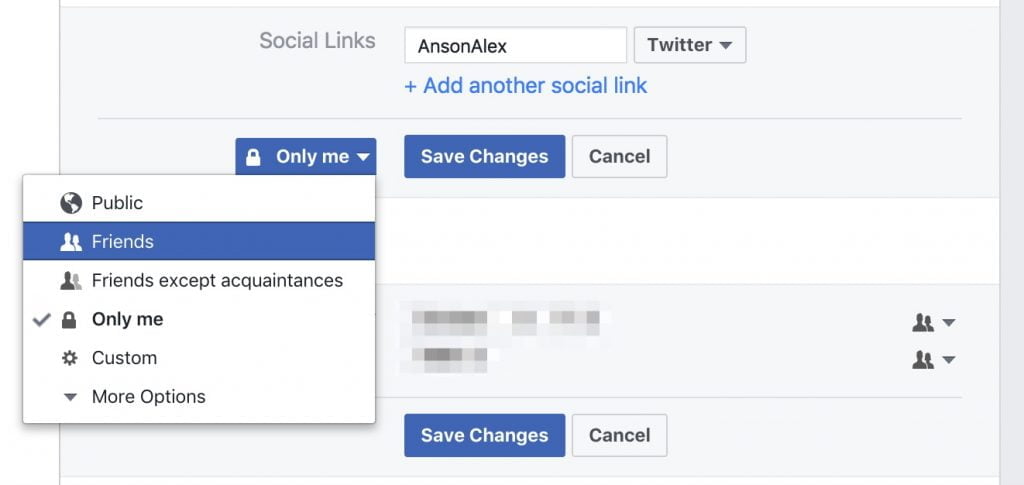
- Once the edit window has appeared, click on the silhouette or pencil symbol dropdown menu to manage the visibility of the selected section.
- From the drop down menu that appears, select the visibility option that you would like to apply.
- Click “Save Changes“.
For more information regarding privacy on Facebook, see my tutorial on managing your Facebook privacy settings.
This article was originally published in 2012 but both the text and video content have been updated (2017) to be as relevant as possible.