“There is no green button to enable Facebook Timeline!”
If you’re experiencing this problem, you’re not alone.
A lot of Facebook users are very excited to get Facebook Timeline but haven’t been able to because the green “enable” button is not appearing.
Facebook has not released any public announcement regarding why some Facebook users can see the button and others can’t.
See Also: Whats Going on with Facebook in 2012? [Video]
As explained in my tutorial on how to get Facebook Timeline, you can enable the new Facebook profile by going to the Facebook Timeline about page and then clicking on the large green button in the bottom right of the screen:
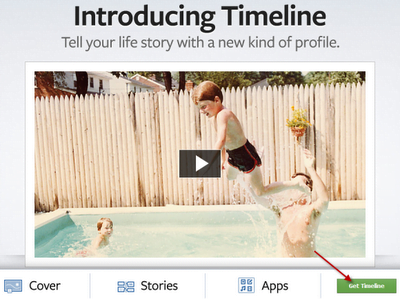
The problem is that many users are unable to view the green button to enable Facebook Timeline.
Up until now, it seems as though it was random in regards to who was able to view the green button and who wasn’t.
After scouring the web and reading comments left by my readers, I’ve come up with a few possible solutions to make the green button available for you:
You can verify your Facebook account by adding your cell phone number to the Facebook Mobile Settings page.
I know some people may not feel comfortable associating their cell phone when their Facebook account and that is understandable.
That being said, a user recently reported on AnsonAlex.com that, after verifying their cell phone number, they were able to then view and click on the green Facebook Timeline button.
Original Comment:

The main purpose for adding your cell number to Facebook is so that Facebook can verify that you’re a real person and haven’t created 20 or 30 different accounts. It is also used to recover your Facebook account if it is ever hacked.
I have not verified this solution but it did sound promising.
If you try it out, please report in the comments section whether it worked or not.
Since the release of the real-time activity ticker on Facebook, I’ve heard some users report that the upgrade was not available to them until they added at least 100 Facebook friends.
This solution won’t work for everyone but Facebook may be looking to upgrade the most active Facebook users before the users that may not be as comfortable with the service.
Try increasing your Facebook activity and you may gain access to the mythical green button!
I know this one may seem a little tedious but, desperate times call for desperate measures.
If you’re not seeing the enable Facebook Timeline button and you’ve tried verifying your cell phone number and adding some new Facebook friends, then I would recommend checking back on the Timeline about page that was linked above on a daily basis.
There is a chance that Facebook only allows a certain number of accounts to be upgraded per day or per week.
If you catch it at the right time you may be in luck!
I will update this post as more solutions are discovered.
As always, if you have an additional suggestions on how to active the green enable Facebook Timeline button, please leave them in the comments section below.
Anson Alexander is a graduate from the University of Tampa with a degree in International Business and Information Systems.A previous IT Administrator for a medium size publication company, Anson has recently decided to work full time on his own business by publishing on AnsonAlex.com, publishing technology tutorials on YouTube and offering SEO, IT training and digital marketing services.His main interests include technology, social media, infographics, economics, marketing and web design.Connect with Anson on Google+.
<strong>Why can't I use Facebook Timeline?…</strong>
If you're not seeing the green enable Facebook Timeline button, I've compiled some suggestions in this article to get the button to appear: http://ansonalex.com/social-media-2/no-green-button-to-get-facebook-timeline-fix/…
Hi y'all,
same thing here, not really familiar with Facebook but can't change my old version to the new Timeline one. No green button anywhere. It doesn't switch to the Timeline version after adding an app like many people suggest on the web. Wonder what the issue is. I'll keep looking into it and will let you know if/when I get it sorted!
Best rgds,
Paul
OK it seems you have to wait for 30 days, so after searching for a solution for about 9 hours I'm gonna stick with the old version quietly for the next 29 days and see what will happen. Found the information here: http://abrax.us/Facebook/GetTimeline.php
Best regards,
Paul
tried to verify mobile no. Its not working.
gonna try 100 friends.
IF IT WON'T WORK I AM GONNA QUIT FREAKING FB!!
I can only see the button when I'm logged out of facebook…the moment I log in it disappears! weird:(
After setting up an account for my mother, I was surprised to find that the timeline option was not available. I had almost assumed that it would be the default for new accounts now given the number of people who have switched already.
Guess it's still technically in beta while they work out the bugs…