Last updated: December 27, 2025
This collection is actively maintained and expanded as new AI tools, workflows, and professional use-cases emerge.
This page is a curated collection of high-impact AI prompts designed for professionals who want better results, less friction, and more leverage from tools like ChatGPT, Claude, Gemini, and other modern AI systems.
Whether you work in business, marketing, education, writing, development, management, design, or consulting, these prompts are structured to produce clear, useful, professional-grade outputs — not vague or generic responses.
Each prompt is intentionally written so you can copy it, paste it, adjust a few details, and immediately get better results from AI.
I continue expanding this library over time as new workflows, tools, and use-cases emerge.
Popular Use-Cases for These AI Prompts
- AI prompts for productivity — streamline daily work, planning, and decision-making
- ChatGPT prompts for business — strategy, operations, and leadership workflows
- AI prompts for writing — editing, rewriting, outlining, and clarity improvements
- AI prompts for project management — planning, timelines, dependencies, and risk analysis
- AI prompts for learning — faster skill acquisition and knowledge retention
- AI prompts for marketing & SEO — content optimization and audience targeting
How to Use These AI Prompts at Work
If you’re new to working with AI tools, these prompts are designed to remove guesswork. Simply copy the prompt, paste it into your AI tool, and replace any placeholders with your own information. The more context and clarity you provide, the stronger your results will be.
These prompts are optimized for real professional use — including business strategy, management, writing, development, marketing, education, consulting, and technical work.
Who These AI Prompts Are For
- Business owners and entrepreneurs
- Managers and team leads
- Writers and content creators
- Developers and technical professionals
- Marketing and SEO specialists
- Students and educators
- Consultants and analysts
1. AI Prompt Generator (Meta-Prompt)
Based on everything you’ve learned about my preferences, tone, goals, and formatting style in this conversation, generate a reusable AI prompt template that I can apply to new tasks and topics in the future.
The prompt should help future AI systems understand how I like information structured, how detailed the response should be, and what types of outputs I find most valuable.
2. Professional Meeting Summary Prompt
Using the following meeting transcript, produce a clear executive-level summary with the following structure:

1. Meeting Details (date, time, participants, location / platform)
2. Meeting Objective
3. Key Topics Discussed
4. Major Decisions Made
5. Action Items (owner + deadline for each)
6. Risks, Open Questions, or Blockers
7. Next Steps

Write concisely, professionally, and in a way that could be shared directly with leadership.
3. High-Impact Cover Letter Generator
Write a professional cover letter for a job application using the following details:

• Applicant name
• Position title
• Company name
• Relevant experience summary
• Top skills and accomplishments
• Why this role and company are a strong match
• A confident closing and call to action

The tone should be confident, authentic, and compelling without sounding generic or exaggerated.
4. Business Strategy Advisor Prompt
Act as a senior business strategist.
Given the following business description, goals, and constraints, produce:

• A short situation analysis
• Key opportunities and risks
• 3–5 strategic recommendations
• A simple execution roadmap for the next 90 days

Prioritize practical, actionable guidance over theory.
5. Content Optimization & SEO Prompt
Review the following content and optimize it for SEO and clarity.
Improve structure, headings, keyword usage, readability, and overall usefulness while preserving the original intent and tone.
6. Technical Explanation Simplifier
Explain the following technical topic in three levels:

1. Simple explanation for a beginner
2. Clear explanation for a professional
3. Technical explanation for an expert

Use analogies where helpful and avoid unnecessary jargon.
7. Decision-Making Assistant
Help me make a decision between the following options.
Evaluate each option by: benefits, risks, time cost, financial cost, and long-term impact.
Then provide your recommended choice and explain why.
8. Project Planning Prompt
Using the following project description and goals, build a realistic project plan that includes:

• Major milestones
• Task breakdown
• Dependencies
• Risk factors
• A recommended timeline
9. Writing Quality Enhancer
Rewrite the following content to improve clarity, flow, tone, and professionalism while keeping the original meaning intact.
10. Learning Accelerator Prompt
Create a structured learning plan for the following topic.
Include key concepts, recommended practice steps, common mistakes to avoid, and a suggested study schedule.
Frequently Asked Questions About AI Prompts
AI prompts are structured instructions you give an AI system (such as ChatGPT) to guide its output. Better prompts produce clearer, more accurate, and more useful responses.
Professionals use AI prompts to improve productivity, write content, plan projects, analyze information, make decisions, and accelerate learning.
Yes. These prompts are designed to work with ChatGPT, Claude, Gemini, and most modern AI systems. Minor wording adjustments may be needed per platform.
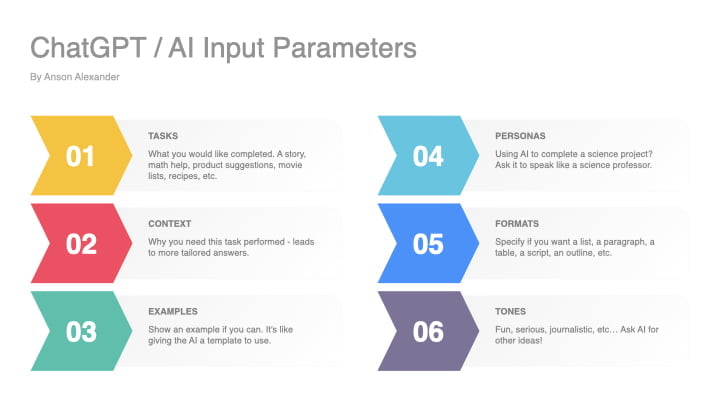
Provide clear context, define your goal, specify the desired output format, and include constraints such as tone, length, audience, and priorities.
More AI Prompts Coming Soon
This collection will continue to grow as new professional AI workflows, tools, and capabilities emerge.
Bookmark this page and feel free to adapt these prompts to your specific industry or projects.