Most of you have probably heard that Google+ recently released business pages for companies and organizations on Google+.
As an early adopter, I quickly created a business page for AnsonAlex.com.
Although a full fledged article on Google+ business pages will be released in the near future, I wanted to write a quick post on an initial problem that I experienced directly after creating my Google+ business page.
Before I forget, don’t forget to check out the rest of my Google+ tutorials after you’re finished with this one!
How Can I Switch Back and Forth Between my Personal and Business Google+ Profiles?
- Go to the “home” or “photos” tab in either your Google+ business page or personal profile.
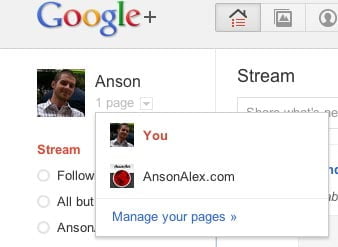
- On the left side of the page, below the “Google+” logo, you’ll notice a thumbnail of either your profile picture or your business page logo. Click on the upside down “triangle” next to the image.
- Select the profile or page that you would like to use.