Last updated: January 2026
Most people try to improve typing accuracy the wrong way.
They slow down dramatically, overthink every keystroke, or restart from scratch — and end up losing confidence, motivation, and momentum.
The truth: You can improve typing accuracy without permanently slowing down — if you focus on the right variables.
This guide explains why typing mistakes happen, how accuracy actually improves, and how to practice so accuracy and speed increase together.
Table of Contents
- My recommended system (fast + clean)
- Why typing accuracy breaks down
- Accuracy comes from certainty, not caution
- The 95% rule (the fastest path to accuracy)
- Why isolating keys fixes accuracy faster
- The biggest accuracy killers (and how to fix them)
- A simple daily routine that works
- Frequently Asked Questions
- Where to go next
My recommended system (fast + clean)
If you want accuracy and speed without building bad habits, run this simple loop:
- Learn one focused lesson (text + video)
- Practice the matching keys (short, accuracy-first)
- Review what you missed, then repeat
This is exactly how my typing hub is structured — lesson pages + matching practice in TypeDrift.
Why typing accuracy breaks down
Typing mistakes almost never come from “bad fingers.” They come from unstable habits.
- Inconsistent finger placement
- Guessing key locations instead of knowing them
- Rushing before muscle memory is stable
- Practicing too many keys at once
When these habits stack up, your brain starts compensating — and that’s when errors spike.
Accuracy isn’t about typing slower. It’s about typing with less uncertainty.
Accuracy comes from certainty, not caution
This is the core idea most typists miss:
Accuracy improves when your fingers know where to go — not when you hesitate.
Slowing down too much can actually introduce new errors:
- You lose rhythm
- You overcorrect mid-keystroke
- You second-guess muscle memory
The goal is to stay just below your error threshold — where mistakes are rare but movement stays fluid.
That’s where accuracy improves naturally.
The 95% rule (the fastest path to accuracy)
Aim to practice at a pace where your accuracy stays around 95% or higher.
This range creates the best learning conditions:
- Below 90%: too many corrections → sloppy reps
- 95%+: clean repetition → stable muscle memory
- 100%: often too slow to reflect real typing
How to use this: If accuracy dips, slow slightly. If accuracy stays high, let speed rise on its own.
This balance is where speed and accuracy grow together.
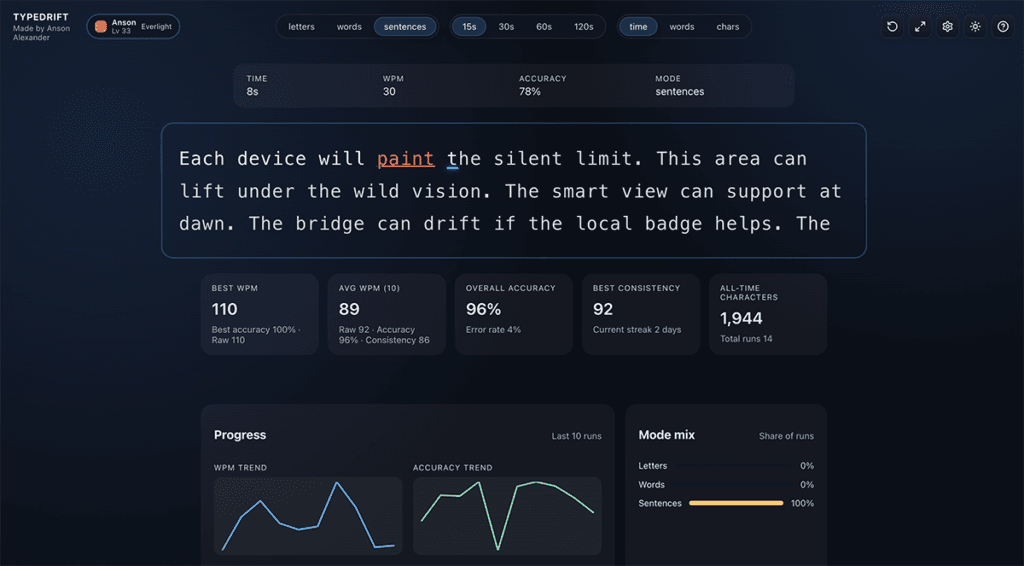
Use TypeDrift to fix accuracy faster
Most people feel like they’re “bad at accuracy,” but it’s usually just a few specific keys or key-pairs causing the damage.
TypeDrift helps you spot and fix that quickly by tracking mistakes per key (and common key pairs), then letting you practice only what you’re missing.
Why isolating keys fixes accuracy faster
Accuracy problems are almost always localized — one reach, one finger, one side of the keyboard.
But most people practice everything at once — which hides the real issue.
Isolated practice works faster because it removes guesswork:
- You reinforce correct finger returns to home row
- You eliminate weak keys instead of masking them
- You stop before fatigue creates new errors
Example: If your accuracy tanks on R and T, the fix isn’t “type slower.” The fix is short drills that force clean reaches from the home row, then returning to the correct finger position every time.
That’s also why accuracy-focused tools that surface “most missed keys” and let you remove or target specific keys accelerate progress — you practice what matters instead of hoping it improves.
The biggest accuracy killers (and how to fix them)
Important: If you “practice fast” while making frequent mistakes, you’re training the mistakes. Clean reps are what build reliable accuracy.
1) Looking at the keyboard
Every glance down interrupts spatial learning.
If you get lost, reference a finger chart — not the keys themselves. That preserves the learning loop.
2) Practicing too long
Fatigue causes sloppy keystrokes and unreliable reps.
10–15 focused minutes beats an hour of grinding every time.
3) Chasing speed early
Speed before accuracy locks in mistakes.
Fix: Pick a pace where you stay around 95%+ accuracy, then increase speed only when the error rate stays stable.
A simple daily routine that works
Consistency beats intensity. Here’s a routine that actually works:
- Learn: read or watch one focused lesson
- Practice: drill only those keys for 10–15 minutes
- Stop early: finish while accuracy is still high
What “stop early” means: Don’t grind until you’re sloppy. Quit while your reps are clean so tomorrow starts strong.
If you do this consistently, accuracy improves quietly — then speed jumps seemingly overnight.
Frequently Asked Questions
No. Slow down slightly to stay near 95%+ accuracy, but keep a natural rhythm. If you go painfully slow, you often introduce hesitation errors and lose timing.
Not usually. 100% often means you’re moving too cautiously. Clean practice with occasional small mistakes (around 95%+) tends to build faster, more usable accuracy.
That’s a sign the issue is localized. Isolate those keys (and common key pairs) and drill them in short sessions until the reach feels automatic.
For most people, 10–15 focused minutes is ideal. Longer sessions can work, but only if accuracy stays high and your hands don’t get fatigued.
Yes. When errors drop, you waste less time correcting, pausing, and re-orienting. That efficiency usually shows up as a speed increase without “trying” to type faster.
Where to go next
If you want a structured path that reinforces accuracy at every stage, start with the hub. If you want the fastest way to repair weak keys, practice accuracy-first in TypeDrift.