Click here to view the Complete Google+ Setup Guide
I’ve compiled a list of shortcut keys for Google+ below. They really help you move through the interface and help avoid some display bugs that occur when just using the mouse.
My favorite one is when writing a comment, press Tab + Enter to submit the comment. Enter alone doesn’t work because it is used to perform a carriage return.
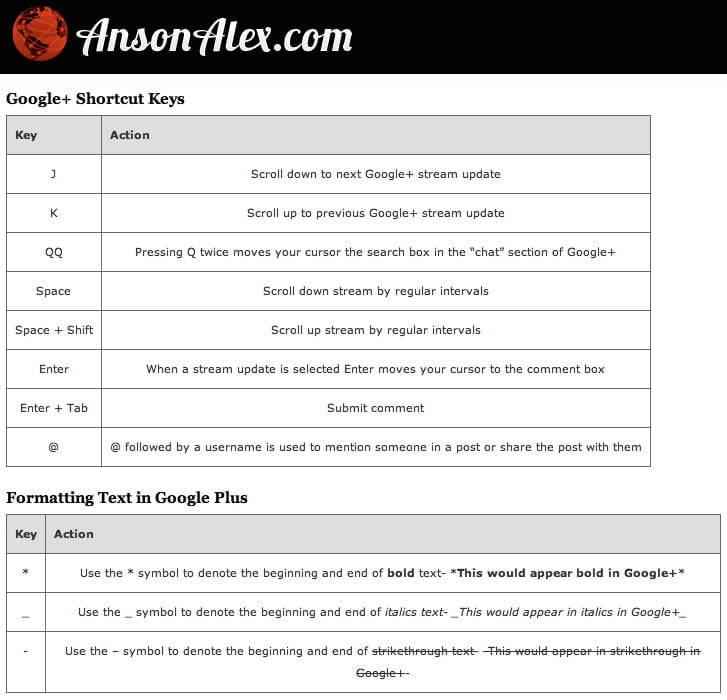
| Key | Action |
|---|---|
| J | Scroll down to next Google+ stream update |
| K | Scroll up to previous Google+ stream update |
| Pressing Q twice moves your cursor the search box in the “chat” section of Google+ | |
| Space | Scroll down stream by regular intervals |
| Space + Shift | Scroll up stream by regular intervals |
| Enter | When a stream update is selected Enter moves your cursor to the comment box |
| Enter + Tab | Submit comment |
| @ | @ followed by a username is used to mention someone in a post or share the post with them |
| Key | Action |
|---|---|
| * | Use the * symbol to denote the beginning and end of bold text- *This would appear bold in Google+* |
| _ | Use the _ symbol to denote the beginning and end of italics text- _This would appear in italics in Google+_ |
| - | Use the – symbol to denote the beginning and end of |
Anson Alexander is a graduate from the University of Tampa with a degree in International Business and Information Systems. He currently works full time as an IT Administrator and manages AnsonAlex.com as a hobby. His main interests include technology, social media, infographics, economics, marketing and web design. Connect with Anson on Google+.
like the j and k.. reminds me of vi unix days
Then you'll like the fact that in most other Google products, you have the same shortcuts, such as in GMail, Reader, and Calendar, and possibly more.
This finally sounds like Google is headed in the right direction, but I imagine Facebook will respond very quickly to this.
Not sure how much Facebook can do…they're experiencing net losses in users in the "1st world" and they've completely lost the battle for user trust.
People continue to trust Google because while they'll advertise to you, they won't sell you out to do so.
I could be wrong but I think Facebook just got put on the MySpace track.
[...] 7. Learn How to Use Shortcuts in Google+ [...]
They've added a new shortcut – m for mute.
[...] Google Plus Keyboard Shortcuts [...]
[...] you to the next item, while K takes you to the previous item. A full list of shortcuts can be seen here. A similar option on Facebook would no doubt be welcomed with open [...]
[...] 因為快速鍵的啟動,Google+ 也做了一些快速鍵讓使用者方便在首頁使用,這些快速鍵在其他 Google 產品上也可以通用,例如 Google Reader。像是「J」可以讓你切換到下一頁,而「K」可以回到前一頁。完整的快速鍵列表在這。這樣類似的功能我想臉書應該不會吝嗇別人也有吧! [...]
[...] you to the next item, while K takes you to the previous item. A full list of shortcuts can be seen here. A similar option on Facebook would no doubt be welcomed with open [...]
[...] götürürken, ‘K’ sizi bir öncekine götürür. Google+‘ın diğer kısayollarına buradan ulaşabilirsiniz. Önceki Haber: ‹‹ Çin’den Sosyal Medya ve E-ticaret [...]
[...] sosyal ağı olan Google +’ın da çeşitli kısayol tuşları da var. Ulaşmak istiyorsanız buraya tıklamanız yeterli. Bir sonraki yazımızda görüşmek üzere… Deneme alt yazısı… [...]
[...] sosyal ağı olan Google +’ın da çeşitli kısayol tuşları da var. Ulaşmak istiyorsanız buraya tıklamanız yeterli. Bir sonraki yazımızda görüşmek üzere… Reklam Vermek [...]