Make Old Facebook Posts NOT Public (Friends Only)

If you’ve enabled Facebook Timeline (directions on enabling Facebook Timeline) you may or may not have noticed that a lot of your old posts, photo galleries and comments are now public facing.

If you haven’t noticed yet, take a look at your Facebook Timeline page and check the visibility of your posts – you may be surprised how many of them are now public facing.

See also: How to View Your Facebook Profile as a Public User

This article will explain how you can change the visibility of all of your public facing posts with the click of one button.

You can check the visibility of a post by mousing over the “visibility icon” at the top left of a Facebook post – next to where the post date and time is displayed:
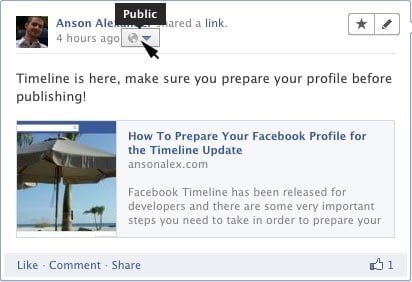
Facebook Post Visibility Icon

I think it is very sketchy and deceitful of Facebook to make so many posts public when you enable Timeline but fortunately, there is a way to bulk change the visibility of old Facebook posts so that they are not public. I’ve already written a post on how to prepare your Facebook profile for the Timeline update but I believe this issue deserves its own post.

How To Hide Old Facebook Posts From The “Public”:

  1. Click on the drop-down arrow at the top right of your Facebook profile and then click on privacy settings.
  2. Facebook Privacy Settings

  3. Find the section labeled “Limit the Audience for Past Posts” and click on “Manage Past Post Visibility“.
  4. Manage Past Post Visibility Facebook

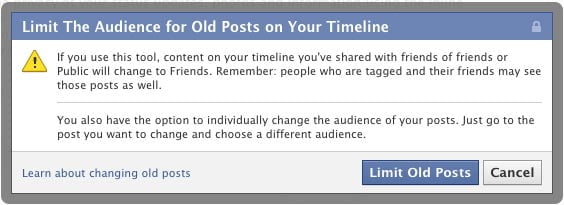
  5. In the box that pops up click on the blue “Limit Old Posts” button.

What Does “Limiting Old Posts” on Facebook Really Do?

By following the instructions above, all of your Facebook posts that were visible to either “Friends of Friends” or “Public” will now only be visible to people you’ve added as friends.

This is probably the most important procedure you should complete when setting up your Facebook profile for the Timeline update. After you’ve completed this, you probably want to make sure you complete all other profile preparations for Facebook Timeline.


Anson Alexander

About Anson Alexander

Anson Alexander is a graduate from the University of Tampa with a degree in International Business and Information Systems.A previous IT Administrator for a medium size publication company, Anson has recently decided to work full time on his own business by publishing on AnsonAlex.com, publishing technology tutorials on YouTube and offering SEO, IT training and digital marketing services.His main interests include technology, social media, infographics, economics, marketing and web design.Connect with Anson on Google+.

16 Responses to "Make Old Facebook Posts NOT Public (Friends Only)"

  1. Azita Nafezy says:

    hi,,,i dont like timeline,,how can i change my profile to old virsion & remove timeline?

  2. Chance says:

    I've tried this and it doesnt work, anybody (who isnt my friend on facebook) has acces to my whole facebook profile as if he actually were my friend. I've put everything to "friends only" but it doesnt change anything.

    Can anybody help me ?

  3. lhen says:

    hmm !! pano boa maq time line hah ??

  4. lhen says:

    hmm ..

  5. sandeep says:

    Use Internet explorer 6 to get rid from time line

  6. Naomi says:

    this didn't help. if you go to mine , you see two pics over two past years ( the rest is hidden) and , lo… they are photos of tattoos i have had done in hidden spots to hide from employers, not that i am ashamed of them, i got them for me. but i would hate to be judged by a potential employer just because i have allowed a public viewing of my tattoos. seriously.

  7. Naomi says:

    i figured it out, it was when i had posted them publicly to fan site for tattoos. i deleted the post of when i did this, fixed.

  8. nick-bacho says:

    I have tried this all but it didn't work… I think there is no way out… please send me message if something will be founded about this problem ;)

  9. stephanie says:

    how can i get timeline on my profile

    1. Anson Alexander says:

      Try this Stephanie: http://ansonalex.com/videos/get-facebook-timeline-2012-video-tutorial/

      - Anson

  10. Bob G says:

    I've decided to experiment with public posts on my Timeline. However, when friends comment on these posts, their comments are also public. I am going to put up a post to alert my friends to this. However, is there any way they can easily determine WHICH of my posts is public and which is NOT since they all look the same?

    1. Anson Alexander says:

      Bob,

      The easiest way to tell is to go to your profile page and click the gear icon next to "activity log" and click "view as…". Then, instead of entering a friends name, look at the paragraph above the name box and click on the "public" link. You will now see your Facebook profile as the public sees it including posts, photos, etc.

      Hope that helps!

      - Anson

      1. Bob G says:

        Anson,

        I know that will allow me to view my page as the public sees it. However, I've been on Facebook, like many users, for a few years now and have accumulated several friends. We are accustomed to seeing each other's posts and commenting on them.

        The problem is that there appears to be no way for my friends to know that the post they are commenting on is public rather than "friends only" as is usually the case since both public AND private posts are intermingled in the news feed. This means that they are unwittingly making a fully public post WITHOUT their knowledge nor consent.

        Do you know of any way to distinguish between an existing friend's public and private posts in the news feed?

        1. Anson Alexander says:

          Bob,

          At the bottom of each post in the news feed, next to where it says "like | comment | share" there is an icon to the right. If you hover your mouse over the icon it will tell you the visibility of the post.

          Let me know if this answers your question.

          - Anson

  11. Bob G says:

    Anson,

    Right you are! That does the trick. Thank you!!!

  12. Maria DFiaz says:

    None of my comments are posting to my timeline, even though my activity log says they should be visible. My pictures are getting on though. But I comment a lot more than I load pictures. Help


Archive


AnsonAlex.com 2011-2013 All Rights Reserved. [Make Old Facebook Posts NOT Public (Friends Only)]