Google recently made some changes to the global Google Calendar settings for those using Google Apps for enterprise or education.
Starting on November 30, 2011, if you previously had Google Calendars with publicly visible events, general users will now only be able to see “free / busy” events.
In order to solve this problem you need to adjust your domain wide calendar settings and then adjust the individual sharing settings for the calendar that you would like to be visible to the public.
This tutorial will show you what steps you need to take to make the necessary changes and allow users not logged in to a Google account to view your public events.
![]()
It took me a little while to figure out how to solve this problem and I had some help from this Google Calendar help thread.
In order to solve the problem of public events on Google Calendar not being visible you need to:


Change that selection to either the second or third option:
1. “Share all information, but outsiders cannot change calendars”
2. “Share all information, and outsiders can change calendars“.


Anson Alexander is a graduate from the University of Tampa with a degree in International Business and Information Systems.A previous IT Administrator for a medium size publication company, Anson has recently decided to work full time on his own business by publishing on AnsonAlex.com, publishing technology tutorials on YouTube and offering SEO, IT training and digital marketing services.His main interests include technology, social media, infographics, economics, marketing and web design.Connect with Anson on Google+.
thanks for the tutorial – most helpful and it worked. all the comments, forums, etc. on this were a bit confusing and this was nice and easy.
Thanks so much! This really saved my hide!
You rock! We were tearing our hair out on this one–especially as we couldn't get a direct answer from Google! thanks so much
Forgive my ignorance. But how do I get to [Access your domain wide settings by clicking on “Manage This Domain“.] This is very frustrating and I feel like I should send Google a bill.
Thanks in advance for your kindness.
Rick,
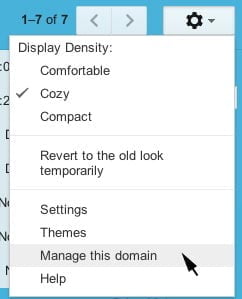
When logged in to your Google Apps account, go to your email inbox and click on the gear icon on the top right, you should see an option to "Manage this Domain". You can follow the above instructions after that.
This applies to Google Apps accounts only.
Thanks so much for this very clear tutorial. It's been really useful to pass on to my colleague who had been tearing his hair out about this. Your efforts are much appreciated by us users, and I hope someone from Google thanks you as well
I have no clue why, but this didn't work for me….any other suggestions? I'm going crazy…
It finally updated and allowed me to fix the problem…THANK YOU!!!
Thank you a million times for this tutorial!
Thanks for the tutorial which i followed exactly. But it still did not help. The option under step 7 :SEE ALL EVENT DETAILS doesn't appear for me, only SEE ONLY FREE etc. do you ahve any other ideas?
Thanks!
Manage your Domains might have moved to the bottom of the page (it did for me). However, still not working, so finding it didn't help much.
I've done all of this, but it still won't save my changes. Any thoughts?
Life saver – thanks!
I as wowrking on this for our Google Apps Calendar that I have shared on our website www.twopeas.ca and I found, after hours of frustrations trying to get this to work, that you CANNOT have the API enabled. The "See All Events" option will never become enabled… even after you follow the above tutorial.
Here is a link about disabling API:
http://support.google.com/a/bin/answer.py?hl=en&answer=60757
Hope this helps some of you that couldn't make it work.
This process allowed me to share my primary calendar (thanks for that ) but any extra shared calendars that I have created do not have the option "see all event details". Any ideas?
I have tried every possible combination that I can think of. This should take seconds, and I've lost half a day trying to share a calendar. I could have built my own iCal server in a fraction of the time. Google produces very flawed products, despite the ingenuity. Has anyone found a solution that still works?
So, I tried the steps listed, to no avail. Then I tried the suggestion to disable the provisioning API (which I wasn't using). Now this is what the situation is:
1. Log in as Google Apps user
2. Create new (Secondary) calendar
3. Choose to "Make Public"
4. The drop down shows BOTH the "Free/Busy" and "All details" options at this point.
5. I choose "All details"
6. Calendar is created.
7. I view the new calendar settings and the drop down now only shows "Free/Busy".
WTF
Update: A little more searching shows this is a known issue for Secondary Calendars. http://support.google.com/a/bin/static.py?hl=en&page=known_issues.cs
Suggest you go to the link above and click the "I am affected by this Issue" button.
Arrrrrgh.
Thanks Toby! Also experiencing the same issue.
Google Apps for Business and I have several Organisations created in the Control Panel.
For the selected Org, the Setting actually says "External Sharing options for primary calendars".
Either the label should exclude Primary (and therefore applies to both Primary and Secondary calendars) or Google Calendar really doesn't allow public sharing of Secondary calendars.
THANK YOU FOR THIS..
The crucial step I missed was logging out and logging back in after you make the #5 step.. You werent kidding about it being an important step
Thanks Anson. Sooo grateful.
Cheers
Hi everyone,
I had the same problem that I wanted to share a secondary calendar and after ages of pulling my hair out and not getting anywhere I found it! Goto Dashboard>Settings>Calendar as usual and then click on the general tab at the top. From here you can change the settings for a secondary calendar.
Thanks
UGH! I've tried all the steps, but still cannot figure out why someone who isn't logged in can't see the calendar!!! I even did the extra step above regarding the secondary calendar. Is it an overnight process or immediate to see the changes??
Immediate but you must log out and log back in to your Google account after making the changes.
I followed all the steps given above but I found that nothing I did allowed me to make a secondary calendar public. It even gave the warning that events would be public. I said yes, but after that it reverted to free time only.
I have no problem if I make the primary calendar public.
This will not work for me, as I am not using google apps or a google domain. I'm using google calendar, but I do still have this issue. So i.e. when you suggest we click on "manage this domain" that does not apply to me, because there is no domain to manage option from my google calendar control panel! Any suggestions for someone who is just using google calendar? Thank you!