If you use multiple Google or Gmail accounts, you may have noticed that Google always seems to open the same account by default — even when you switch accounts inside Gmail.
This happens because Google assigns one account as your default Google account for each browser session. That default account controls which account opens first when you visit services like Gmail, Google Drive, Calendar, YouTube, and more.
In this guide, you’ll learn what a default Google account actually means, why Google sometimes opens the “wrong” account, and how to change your default account correctly.
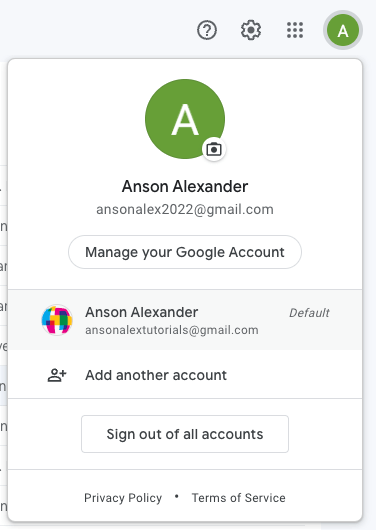
Why Google opens the “wrong” account
Even though you can switch accounts easily inside Gmail, Google services don’t all follow that switch.
When you open a Google service for the first time in a browsing session, Google uses the account that was logged in first. That account becomes your default — regardless of which account you last viewed inside Gmail.
What is a default Google account?
A default Google account is the first account you sign into during a browser session.
This account is automatically used whenever you open a Google service for the first time, including Gmail, Google Drive, Calendar, Docs, Sheets, and YouTube.
Even if you later switch accounts using Google’s account menu, the default account does not change unless you sign out and back in.
Example of how default Google accounts work
Let’s say you sign into Account A first on gmail.com. Then you add Account B using multiple sign-in.
You switch to Account B’s Gmail and start reading email.
Now you open Google Drive or YouTube in a new tab — by default, those services will still open under Account A.
That’s because Account A is still your default account.
How to change your default Google account
Google does not provide a button or setting to choose a default account. Instead, your default account is determined entirely by login order.
- Click your profile image in the top-right corner of any Google service.
- Select Sign out of all accounts.
- Go to google.com/accounts.
- Sign in with the account you want to be your default first.
- Add your remaining Google accounts using multiple sign-in.
The first account you sign into will now be your default Google account for that browser session.
If you regularly work across multiple Google services, it’s best to set your default account to the one you use most often for jumping between Gmail, Drive, Calendar, and YouTube.
If you actually need to use two Google accounts at the same time, that’s a different situation. In that case, see my guide on how to log into a different Gmail account.
Frequently Asked Questions
Your default Google account is the account you sign into first during a browser session. Google uses it when opening services like Gmail, Drive, Calendar, or YouTube in a new tab.
Sign out of all Google accounts, then sign back in starting with the account you want as the default. The first account you log into becomes the default.
Because the account you want is not your default account. Switching accounts inside Gmail does not change your default account for other Google services.
No. Switching accounts using the profile menu does not change the default. The default is set by login order and only changes after signing out and back in.
No, only one account is the default per browser session. To use multiple accounts independently, use a private window or separate browser profiles.
Last updated: January 2026