A number of Facebook users have been seeing ads while using Facebook Timeline that are displayed with a message saying, “ads not by Facebook”.
It turns out that the third party advertisements are displayed via a third party extension installed on your Firefox, Safari or Google Chrome browser.
See Also: Facebook Users: Protect Your Timeline Profile from the Public [Video]
I have not been able to find any information on the legality of these advertisements but one thing is for sure – they are intrusive and annoying!
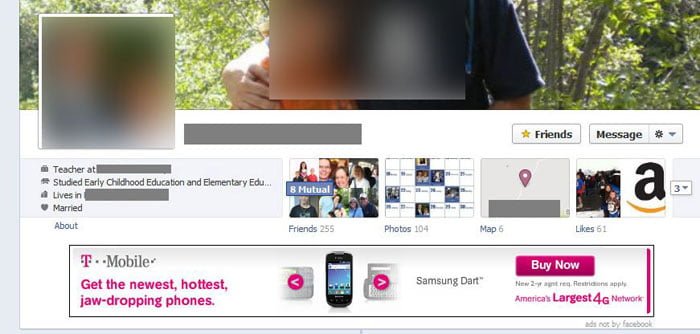
The ads are generally in the form of banner advertisements that show up on Facebook Timeline profiles similar to the one in the image below provided by Tech4Mommies.com:
Facebook has released a help video on removing malware from your Facebook Timeline profile but the video is rather broad and does not address this specific problem.
Depending on which browser you’re using, follow the instructions below to remove the “ads not by Facebook” appearing on your Facebook Timeline profile.
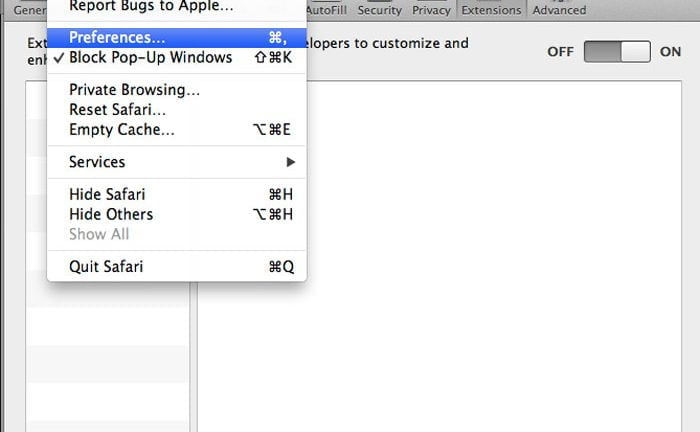
To remove the non-Facebook advertisements you need to access your browser’s extensions and disable any of them that look fishy.
If you see an extension that you didn’t install, disable it. If none of them look suspicious, you should sill disable them one-by-one and check Facebook after disabling each one to see if the advertisements have been removed.
Here are steps to access your extensions in each browser:
Note: After you disable the extensions, you must restart your browser for the changes to take effect.


If you run in to any problems or have additional steps on removing the “ads not by Facebook” virus for Facebook Timeline, please let me know in the comments section below!
Anson Alexander is a graduate from the University of Tampa with a degree in International Business and Information Systems.A previous IT Administrator for a medium size publication company, Anson has recently decided to work full time on his own business by publishing on AnsonAlex.com, publishing technology tutorials on YouTube and offering SEO, IT training and digital marketing services.His main interests include technology, social media, infographics, economics, marketing and web design.Connect with Anson on Google+.
This really DOES work! I was beginning to get annoyed by all of the ads on my facebook. When I clicked on "extensions" in mozilla firefox, I noticed that there was a codec called "Premium Codec-C" by a company named Crossrider that was causing all of the problems. Once I clicked on disable, all of the ads magically disappeared.
Works, thanks! I had to disable "Vid-Saver 1.17.19" from my Chrome extensions to get rid of the ads.
I don't have a menu bar in Chrome. Does that mean I don't have this virus?
Joe
I used firefox, and I get the annoying ads too. I checked my extensions and saw only Mozilla TestPilot could this be the virus?
That could definitely be the virus. Try disabling the extension, restarting your browser and checking Facebook for ads.
Yeap.. Alex, Check this out:
http://www.cert.pl/news/5587/langswitch_lang/en
Maybe this help someone?
Eset Nod32 / Eset Smart Security and DrWEB remove this infection.
Thank you so much. I 've fixed mine. I never had the idea that the problem I was having was from my browser. When I accessed Youtube, I was also seeing nonsense ads all over. You 've saved me a lot.
i dont have google i use just explorer and my facebook timeline is getting bogged down with ads not by facebook..any ideas to remove please
Maggie,
It doesn't matter what internet browser you are using. You need to check your extensions and / or plugins and disable any of them that you don't know what they're for.
Removed Bflix from Mozilla, all annoying ads from FB and YouTube vanished. What a relief
Thank you so much!
I have disabled everything and the ads are still there
Brilliant – it was Codec V, very sudden that it started generating adverts, but deleting it works. Just so you know, just 'disabling' didn't work. It had to come off completely.
[...] if you have downloaded something new recently, it’s worth giving it a check. Here is a more detailed set of instructions for use with the browsers Chrome and [...]
[...] if you have downloaded something new recently, it’s worth giving it a check. Here is a more detailed set of instructions for use with the browsers ChromeRead more at: [...]
Thanks this was it right here!
I just saw my first 'sponsored ad' from Telstra who is actually my mobile ph provider.
I use the Facebook app so there are no browser addons. And I don't have any apps installed.
And when I use different browsers on iPad and desktop ads are still there.
Do you have any further ideas to stop them?
What are instructions to remove ads if you use Internet Explorer?
Thank u remove from Firefox
.
thank you!!!!!!!!!!!!!!!!!!!!!!!!!!
thank you~~~~~~~~!!!!!!!!!!!!!!!!!!!!!!!!!!!!!!!!!!
This is the only one left on my 'extensions'.. & it will not allow me to remove at all! I really want these 'adds not by facebook' to be gone! Any ideas how I can get rid of the following & would it be the extension that is placing these adds on everything?
Deal Boat 1.23.62
Deal Boat Permissions
ID: bjbkkpfgfjlcicclmfakhipaaoifgeno
(This extension is managed and cannot be removed or disabled.)
Inspect views: background.html
Many thanks for any help : )
what if it says.. This extension is managed and cannot be removed or disabled? It wont let me disable
Britney,
I found these steps that should solve your situation:
Do this by these steps:
Control Panel > Folder Options > View > "Hidden Files and Folders" > Select "Show Hidden Files and Folders > Apply
Now follow these steps:
Computer > Local Disk (C:) > Users > (Whatever user you are on your computer) > AppData > Local > Google > Chrome > User Data > Default > Extensions
You should see the folder with the name of the extension you want to get rid of. Completely delete that folder, and I'd also recommend going into the recycle bin and deleting it from there too. This completely got rid of the extension for me.
If you're on a Mac, let me know and I can adjust them for Mac computers.